 GigLens
Know what it takes to rank on Fiverr.
GigLens shows the numbers behind every Fiverr search result: position, ad or organic, reviews, starting price and seller level. Pro tells you how hard a search is to rank for and where your own gigs show up.
Free to install. Desktop Microsoft Edge and Firefox. A Chrome version is planned.
Built to keep your account safe
Fiverr suspends accounts that manipulate its platform. GigLens only reads what is already on your screen.
Read-only
Never clicks, sends messages, bids or changes anything on Fiverr.
No extra traffic
Reads only the search page you opened. It doesn't load other Fiverr pages.
Private
Your searches and rank history stay in your browser. No tracking or analytics.
Research a niche in seconds
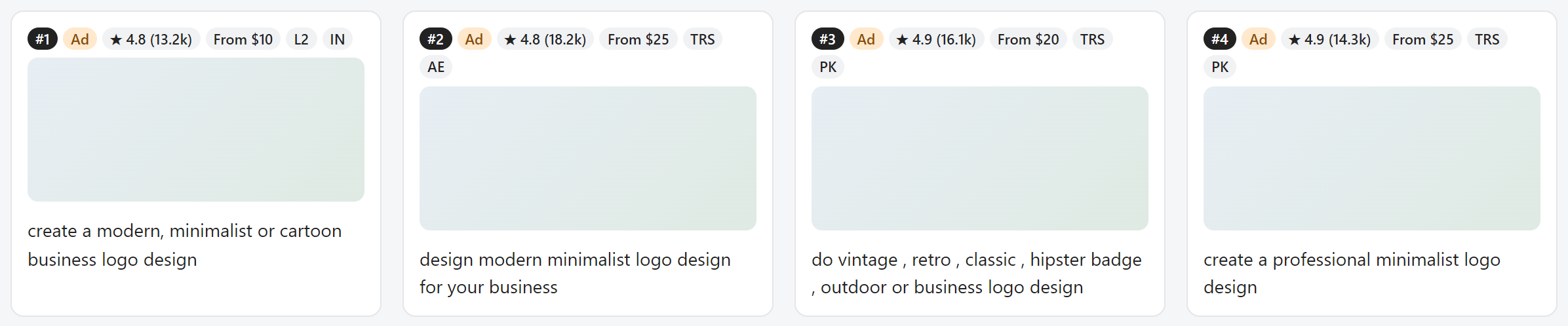
Open any Fiverr search and GigLens adds badges to the results and a panel with the numbers that matter.
Free
- Badges on every gigPosition, ad or organic, rating and reviews, starting price, seller level and country.
- Spot paid adsSee how many results on the page are promoted gigs.
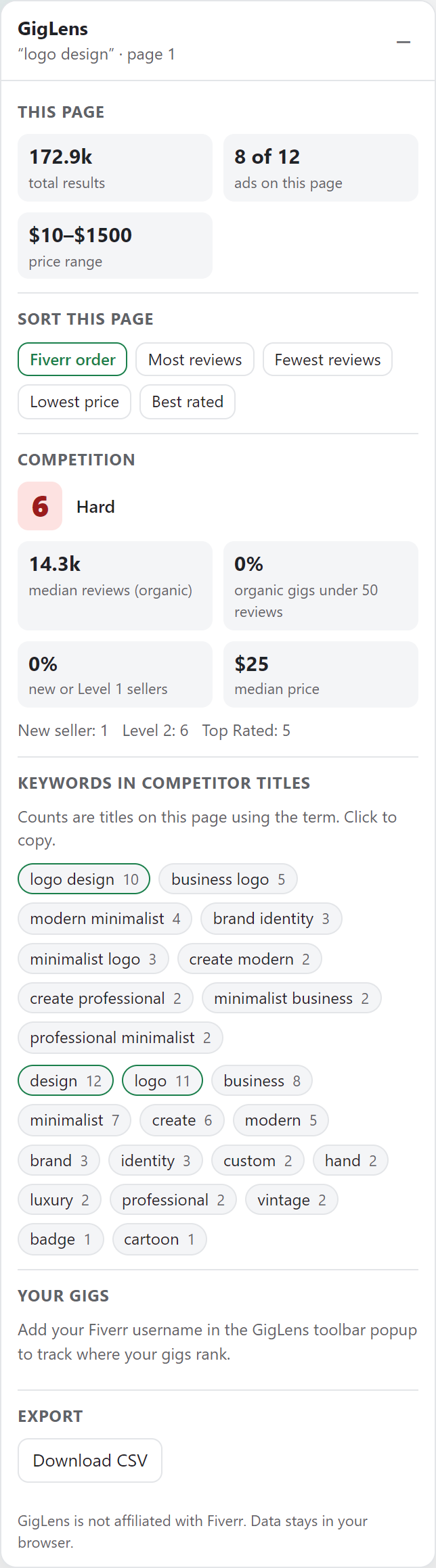
- Sort the pageBy most or fewest reviews, lowest price or best rating.
- Page overviewTotal results for the search and the price range on the page.
Pro PRO
- Competition scoreA 0–100 score for each search, based on reviews, seller levels, ads and total results.
- Title keywordsThe words and phrases top gigs use in their titles. Click any of them to copy.
- Rank trackingSee where your gigs appear for each search and how their position changes.
- CSV exportDownload any results page for your own analysis.
Pricing
Start free. Upgrade when you want the full picture.
Free
$0
Forever
- Badges on every gig
- Ads spotted on each page
- Sorting by reviews, price or rating
- Page overview
Pro
$7 / month
or $49 / year, about 42% less
- Everything in Free
- Competition score for any search
- Keywords from top gig titles
- Rank tracking for your gigs
- CSV export
14-day money-back guarantee. Cancel anytime. One license works in up to 3 browsers. Taxes may apply. Checkout and billing are handled by Lemon Squeezy.
Questions
Is GigLens safe for my Fiverr account?
GigLens only reads information Fiverr already shows on the page you opened. It never clicks, sends messages, bids or loads other Fiverr pages, so it doesn't automate anything on your account.
Which browsers does it work in?
Microsoft Edge and Firefox on desktop. A Chrome version is planned.
How do I unlock Pro?
Buy Pro, then copy the license key from your receipt email. In your browser, open the GigLens toolbar button, choose "Enter license key" and paste it.
Can I use one license in several browsers?
Yes, in up to 3 browsers. To move a license, deactivate it in the browser you no longer use.
How do I cancel?
Use the "Manage subscription" link in your receipt email. Pro stays active until the end of the period you already paid for.
Can I get a refund?
Yes, within 14 days of any payment. See the refund policy.
Is GigLens affiliated with Fiverr?
No. GigLens is an independent tool. Fiverr is a trademark of Fiverr International Ltd.